

Key takeaways
- Mirror Fit Check makes an 8-second, 720p mirror selfie of an AI avatar wearing your garment, for 177 credits, with no speech.
- It takes adult womenswear and menswear only (no underwear, lingerie or swimwear) and needs an avatar, made from a starter, a description or an adult who agreed.
- Check color, print, length and neckline against the listing, and name Kling in the caption.
What the format makes
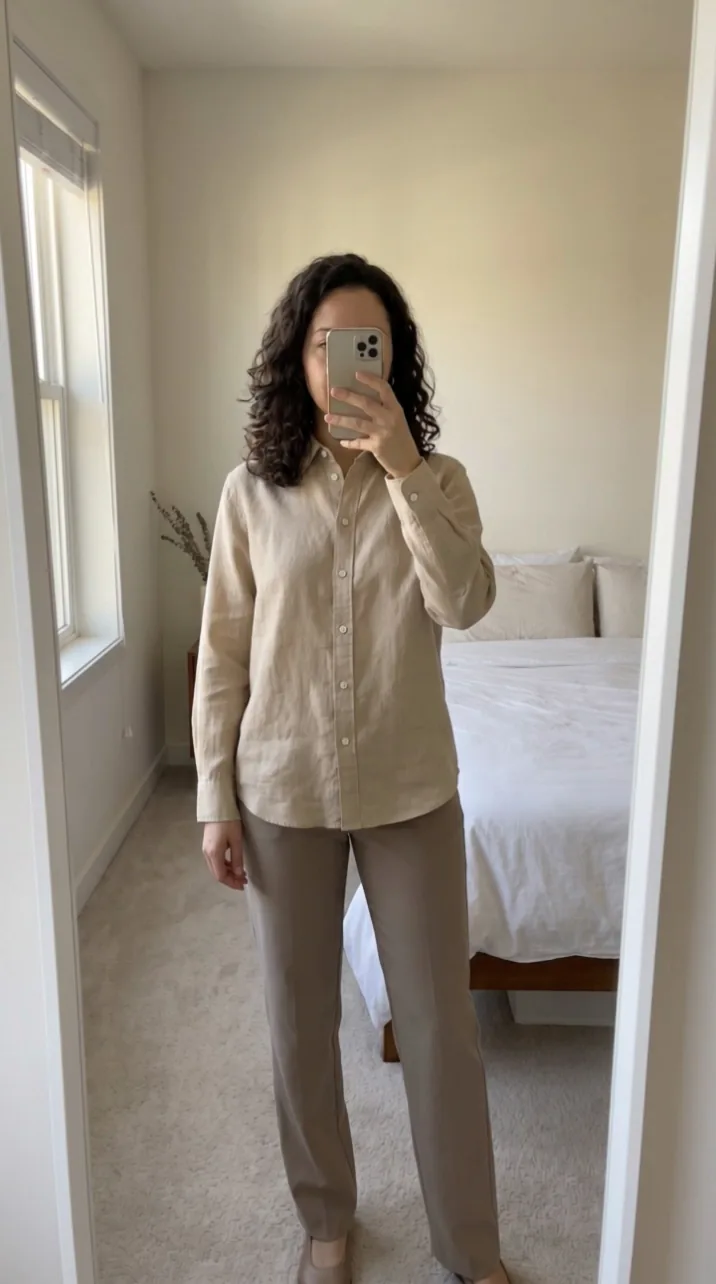
Mirror Fit Check is TurboUGC's clothing format: your avatar shows the clothing in a mirror. The video is a full-length mirror selfie in a bright, tidy bedroom. The person stands facing the mirror and holds a phone at face height, so the phone covers most of the face, then makes small front-facing poses. Nobody speaks.
It runs in three steps, and the run panel shows each one's price before you start:
- Plan the shot, 8 credits: an AI model reads your photos and the listing title.
- Start frame, 29 credits: Nano Banana Pro, Google's image model, puts your avatar in the garment at 2K, 9:16.
- Clip, 140 credits: Kling 3.0, Kuaishou's video model, animates that frame into 8 seconds at 720p.
That makes 177 credits a video. Kling makes the clip silent. With Sound on, the default, we add a quiet room-tone bed at no charge; with it off, the video stays silent.
What it suits
Mirror Fit Check is for clothing worn by an adult: womenswear and menswear. It refuses underwear, lingerie and swimwear, and it doesn't take kids' clothing, because an adult avatar can't wear it. Bags, shoes and jewelry belong in Hold & Show.
The video shows one garment. Wherever the garment ends, plain neutral basics complete the outfit, so a top comes with simple trousers and a skirt with a simple top. If the listing sells a set, such as a matching two-piece, the avatar wears the whole set.
You need an avatar
The format needs an avatar, chosen before you run. Five ready-made AI creators are free to add to your workspace. These starters are invented people made with AI; they don't exist. You can also make your own avatar from a description, or from a photo of yourself or of an adult who agreed. An automated check refuses photos of minors.
Pick an avatar whose build suits the garment's size range, and keep using the same one across a product's videos so your outfits look consistent.
Photos that work
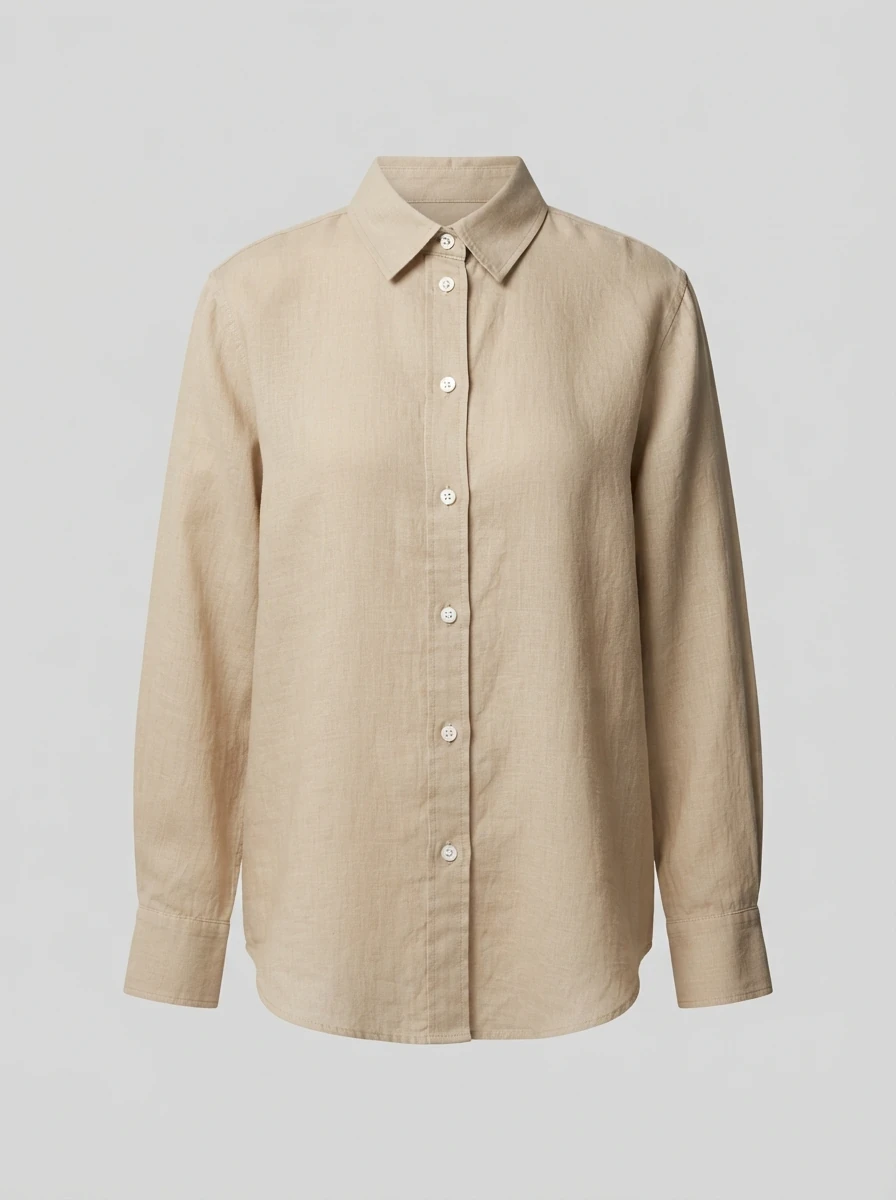
The start frame takes only the garment from your photos: its cut, colors, print, length, fabric and details. Give it photos where those are clear.
- A full-length front view, so the hem and length are visible.
- True color under even light. Avoid photos with strong filters.
- The exact colorway you're selling. Untick photos of other colors.
- A close photo of a print or a detail, if the garment has one.
Check the result against the listing
TikTok Shop's AI content policy (updated 2 September 2026) says you can't use AI to change a product's size, color, material or shape, or show a product that looks different from the product page or what customers receive. With clothing, the risk sits in the details an AI fills in: how long the sleeves are, where the hem falls, how the fabric drapes.
Before you post, check four things against the listing photos: the color, the print, the length and the neckline. If any of them is off, don't post that take. An AI video can show what a garment looks like. It can't prove how it fits a real body, so don't make fit claims from it.
Rules for people and clothes
- Name Kling. Mirror Fit Check's clip comes from Kling, and Kling's terms ask that content made with its models be identified as made with Kling AI, for example in the caption. Our AI Content Policy says the same.
- Keep it suitable for everyone. TikTok Shop's quality requirements ask creators to dress tastefully for a general audience and avoid suggestive poses.
- Never pass the avatar off as a customer. Our AI content policy says never to present an avatar as a real customer or as someone who bought or wore the product. TikTok Shop's AI policy also bars using AI to imitate a real person's likeness without permission.
- No minors, ever. TurboUGC refuses anyone under 18 in an avatar, and our Acceptable Use Policy says the same.
Mix it with videos of you
TikTok Shop's quality requirements for US creators ask product videos to feature a person, your face and the physical product. If you can, pair a Mirror Fit Check video with a quick video of you wearing the piece, or use the AI video for colorways you don't have on hand. At 177 credits a video, the Creator plan's 5,000 monthly credits make about 28.
Creator free for 3 days. $0 today, 310 credits.
Get startedSources
- TikTok Shop Academy, “AI-Generated Content Restrictions and Requirements” · read October 14, 2026
- TikTok Shop Academy, “Requirements for High-Quality Videos and LIVEs” · read October 14, 2026
- TikTok Community Guidelines, “Integrity and Authenticity” · read October 14, 2026